NAILFOLD CAPILLAROSCOPY ANALYSIS SOFTWARE

Capillary.io Desktop Research

Your capillaroscope. Complete analysis on your computer.

Capillary.io Desktop Research brings image capture, CAPI-DETECT AI-assisted analysis, measurements and reporting together on your computer. Use your existing compatible capillaroscope and work locally with unlimited use of your supplied software version. Add an optional pre-installed laptop or Cloud Research access to your package.

  • Unlimited local use
  • All software features included
  • Cloud optional

The same complete Desktop Research software supplied with our Research System, available separately for your own capillaroscope.

Download the Desktop brochure · PDF · English Need equipment too? Explore our hardware options
For Research Use OnlyNot intended for clinical diagnosis or patient management. Clinical editions of Cloud and Desktop are in development under the EU MDR.
Capillary.io Desktop Research
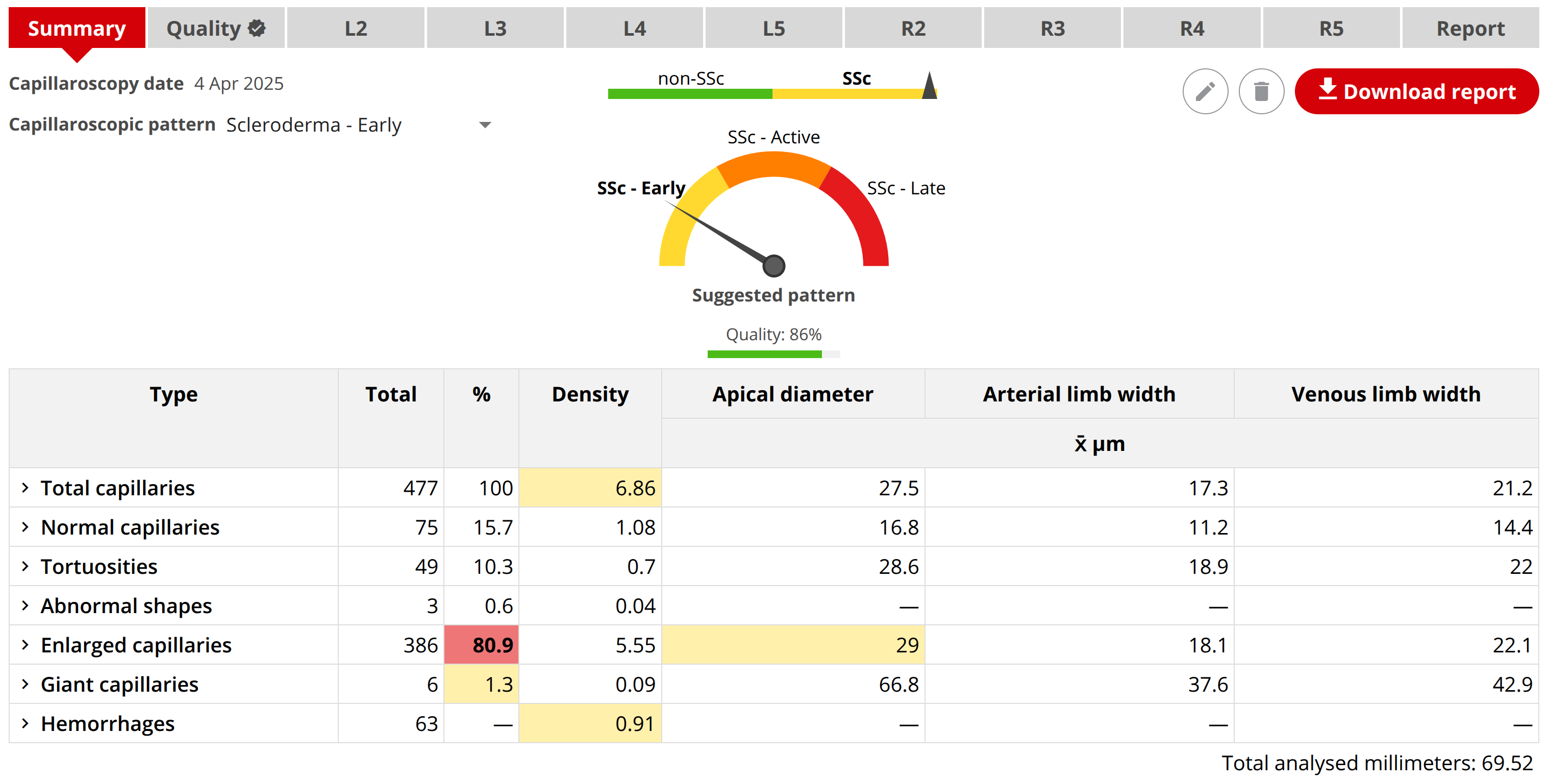
Capillary.io quantitative study summary with capillary density, diameters, morphology and hemorrhage measurements
CAPI-DETECTQuantitative AI analysis
UnlimitedLocal use of the supplied version
LocalImages, studies and reports
OptionalCloud access and hardware

SELECTED BY CAPILLAROSCOPY EXPERTS

Your capillaroscope. All Desktop features included.

Our team combines medical and technical expertise in capillaroscopy. We perform capillaroscopy regularly and have tested every capillaroscope on the market. We use that hands-on experience to confirm capture, calibration and analysis with the equipment you already have.

01YOUR EXISTING EQUIPMENT

Built around the equipment you already have.

Tell us your capillaroscope model and computer setup. We confirm direct capture or an image-import workflow and calibration requirements before purchase. Dino-Lite, Inspectis, Smart G-Scope and Optilia can be assessed for compatibility.

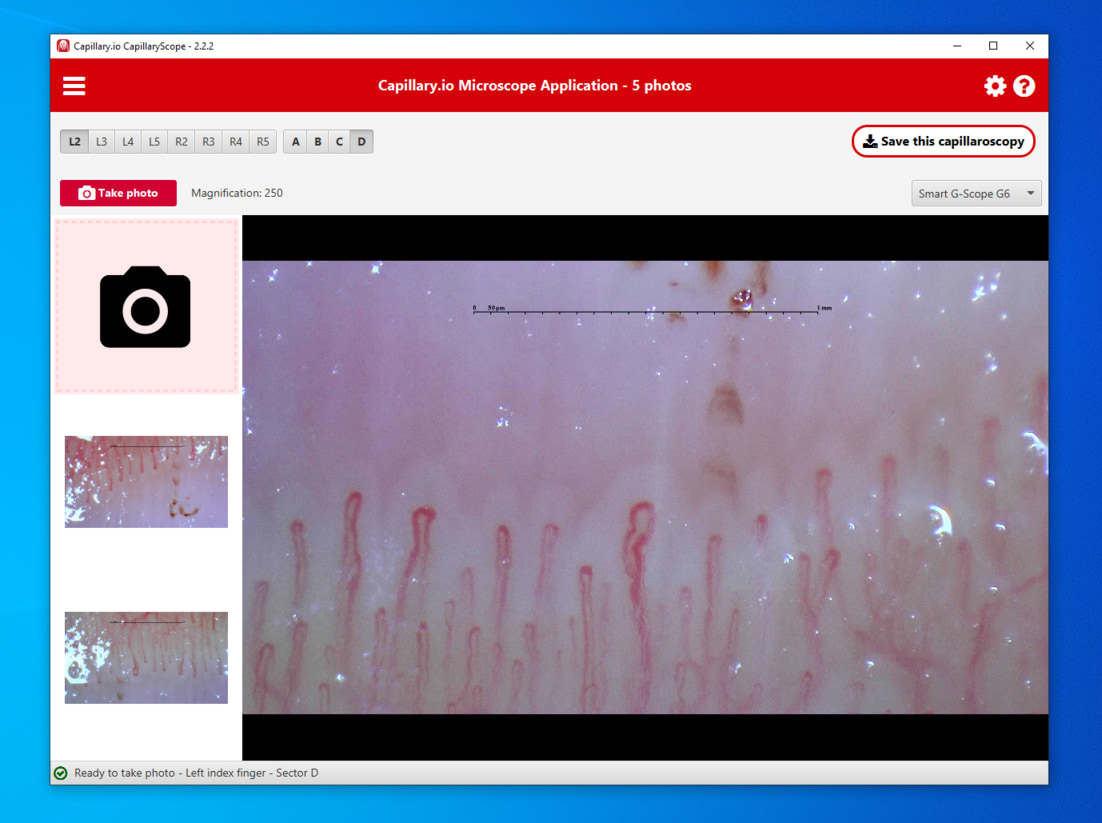
CapillaryScope capture screen showing live nailfold imaging, finger and sector selection, and calibration information
CapillaryScope is the free capture app. Desktop Research adds the complete local analysis, study database, reporting and export workflow. You can also start from existing image files.
  • Direct capture or an image-import workflow, confirmed before purchase
  • Finger, sector and calibration information kept with your images
  • Dino-Lite, Inspectis, Smart G-Scope, Optilia and other devices assessed for compatibility
Download CapillaryScope
02QUANTITATIVE ANALYSIS

Capillary.io Desktop Research

State-of-the-art CAPI-DETECT image analysis, with expert review built in. Detect and quantify capillaries, refine annotations and turn your images into structured reports and exportable data—all locally.

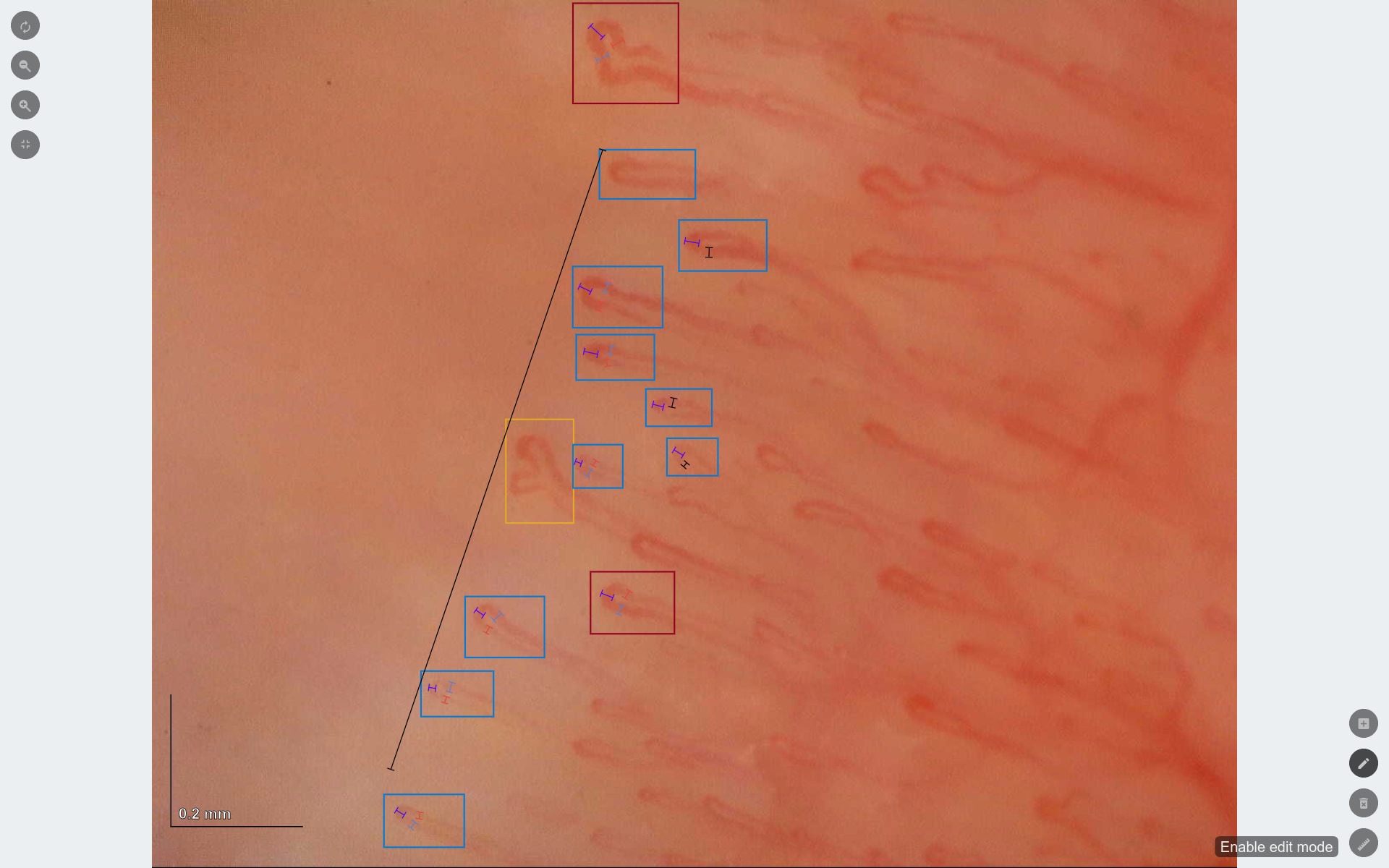
Capillary.io image analysis showing capillary annotations and measurement overlays
Capillary.io image review and measurement tools, included in the local workflow.
  • AI-assisted capillary detection and quantification
  • Study database and image review
  • Structured reporting and measurement export
  • Search & export with combined filters, Excel and CSV downloads
  • No Cloud subscription or monthly image quota for local use

A complete local workflow, configured for your team.

Get all Desktop Research features with unlimited local use of the supplied version. Use your own compatible computer or ask for an optional laptop with the software pre-installed. We confirm your capture or image-import workflow and calibration requirements before purchase.

  • All Desktop Research software features included
  • Compatibility and calibration confirmed for your setup
  • Installation, training, updates and support specified in your quote

Desktop Research is the software-only offer; a capillaroscope is not included. Your quote details the software licence, installation, training, updates and support. A pre-installed laptop, Cloud Research and hardware can be quoted separately or included in a tailored package.

YOUR SOFTWARE, INCLUDED

A complete capillaroscopy workspace. On your own computer.

Designed by clinicians and engineers who perform capillaroscopy, the interface keeps images, fingers, measurements and reports connected in one clear workflow. Every tool below is included in Capillary.io Desktop Research. Work locally from the first capture to the final report, without sending images to Cloud.

All these software features are included.Use the supplied desktop version as much as you want. Local analysis does not consume Cloud credits or depend on a monthly image allowance.

Screenshots illustrate Capillary.io software and may show Cloud controls. Desktop Research runs locally; Cloud access is optional.

QUANTITATIVE OVERVIEW

See the measurements behind each study.

Bring image-level analysis into a structured study summary. Explore capillary counts, density, dimensions and morphology, and open the underlying images to check each finding.

Capillary.io quantitative study summary with capillary density, diameters, morphology and hemorrhage measurements
Study summary with measurements, source images and automated findings for expert review.
  • Capillary density
  • Apical diameters
  • Limb widths
  • Morphology
  • Giant capillaries
  • Hemorrhages

01 / CAPTURE

Start with organized acquisition.

Capture nailfold images with the desktop capture tools and keep finger, sector and calibration information connected from the start. You can also work with existing image files.

CapillaryScope capture screen showing live nailfold imaging, finger and sector selection, and calibration information
  • Live camera view and image capture
  • Finger and sector labeling
  • Calibration information and local image saving

02 / STUDY REVIEW

Keep the whole study in view.

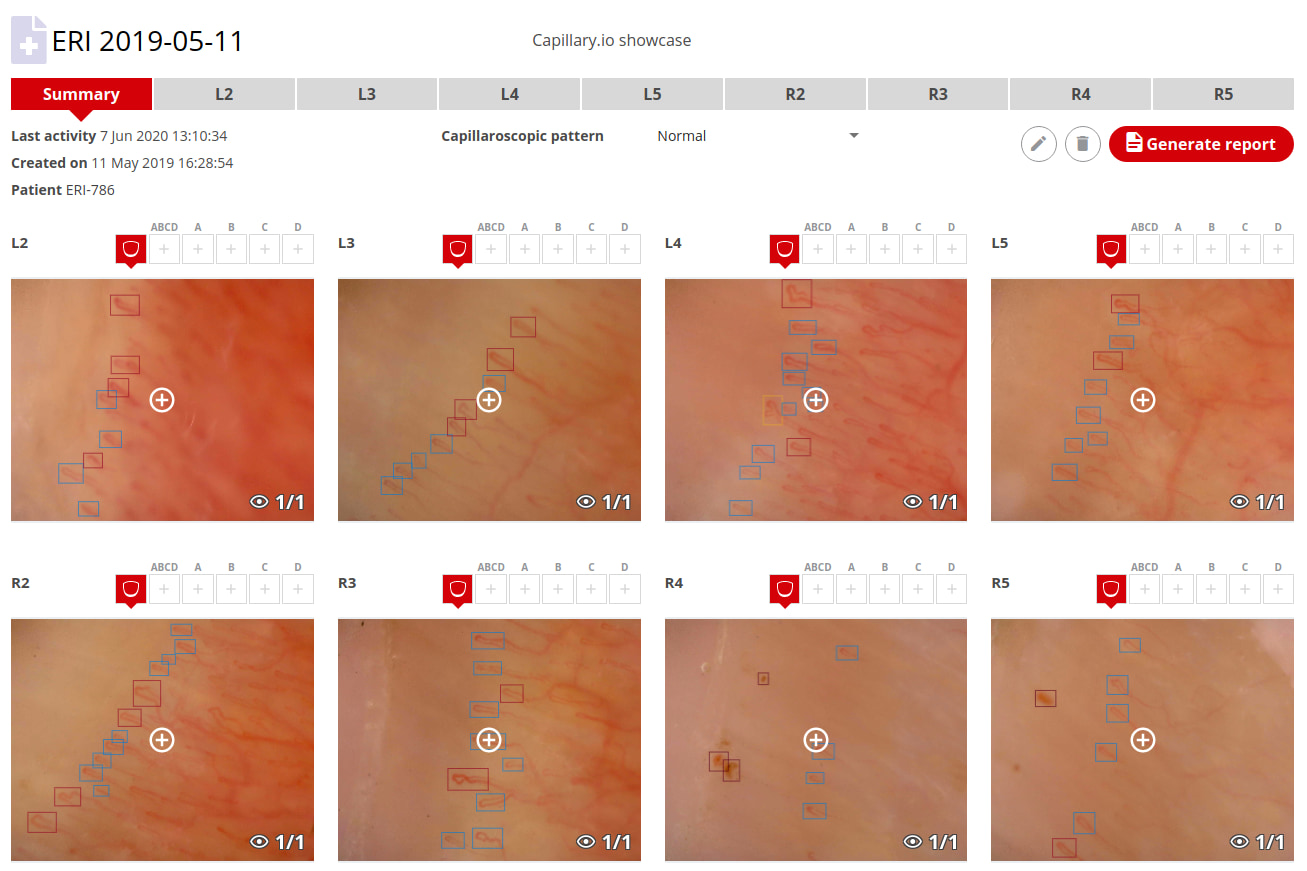
Browse the images that belong to each capillaroscopy in one organized study. Move between fingers and sectors while keeping annotations and findings linked to their source images.

Capillary.io study overview with nailfold images organized by finger and sector
  • Images grouped by finger and sector
  • Multiple images within each study
  • Direct access to image analysis and annotations

03 / IMAGE QUALITY

Check quality before drawing conclusions.

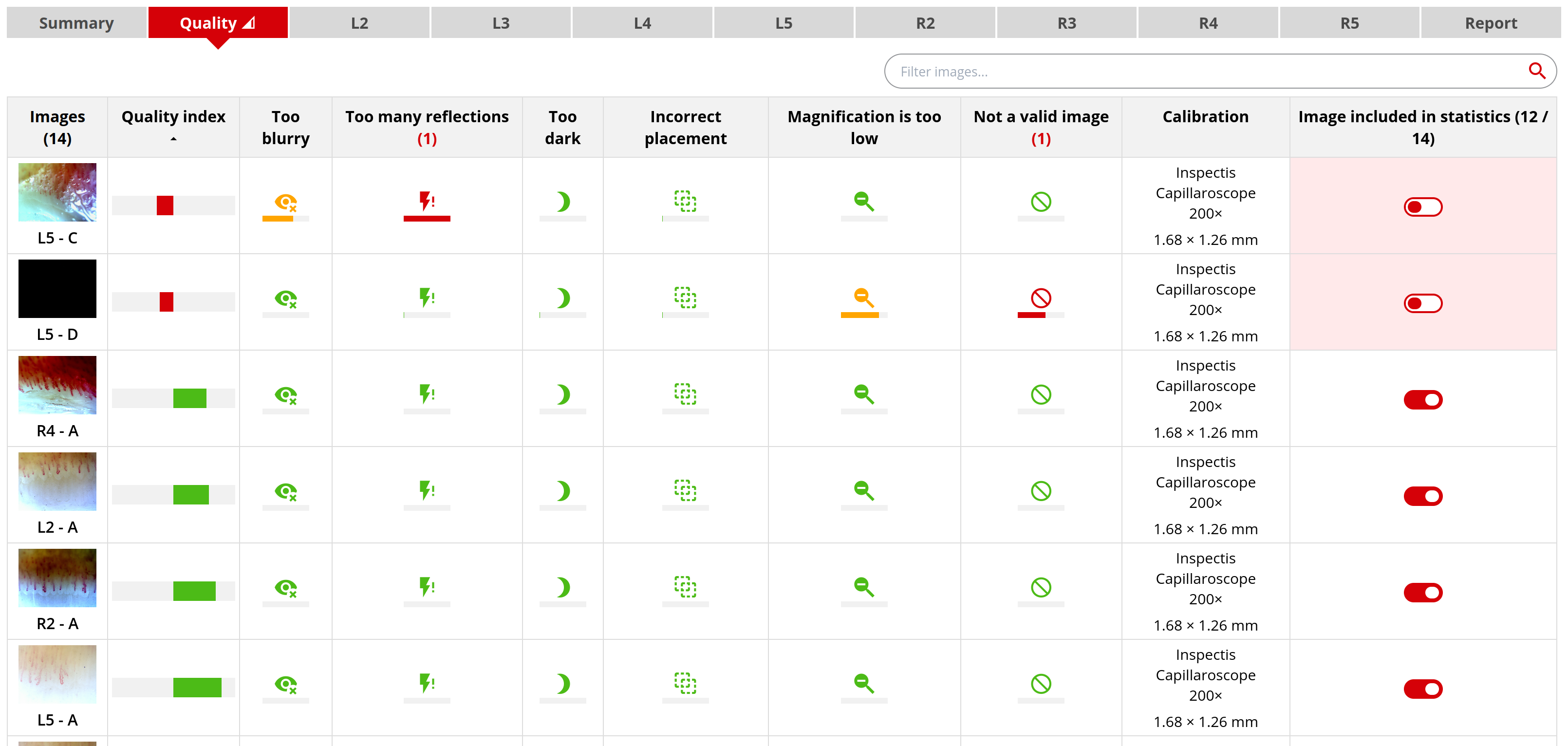
Review automatic quality indicators alongside the images. Identify blur, reflections, dark images and calibration issues, and decide which images belong in the study statistics.

Capillary.io image quality table showing blur, reflection and calibration indicators and image inclusion controls
  • Automatic image quality assessment
  • Review acquisition and calibration issues
  • Control which images contribute to study statistics

04 / IMAGE FILTERS

Look more closely at the details.

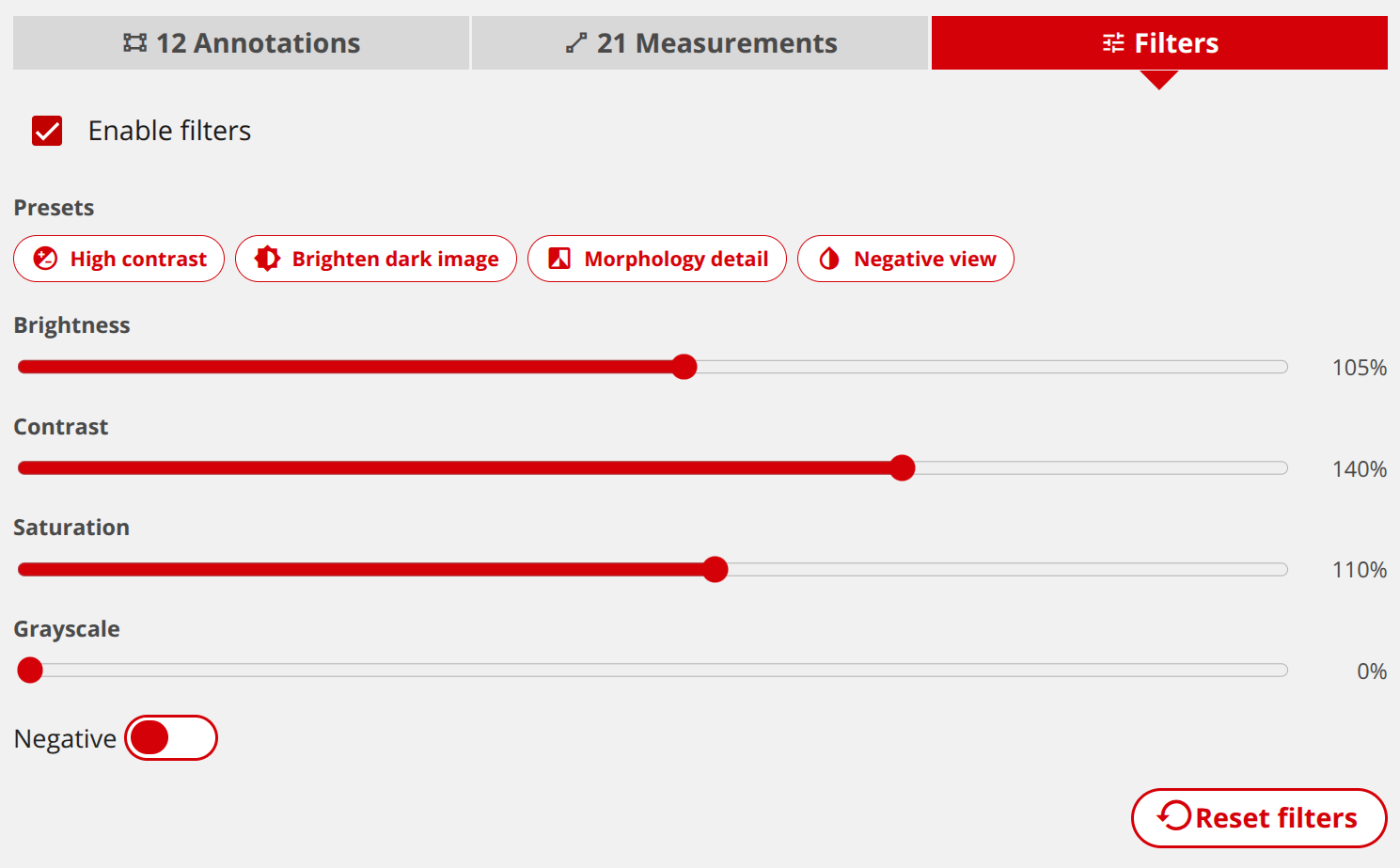
Adjust the image display to inspect capillary morphology and low-contrast areas. Use viewing presets or fine-tune the controls as part of your image review.

Capillary.io image filters with brightness, contrast, saturation, grayscale and negative-view controls
  • Brightness, contrast and saturation controls
  • Grayscale and negative views
  • Presets for high contrast and morphology detail

05 / REVIEW AND ANNOTATION

AI assistance, with you in control.

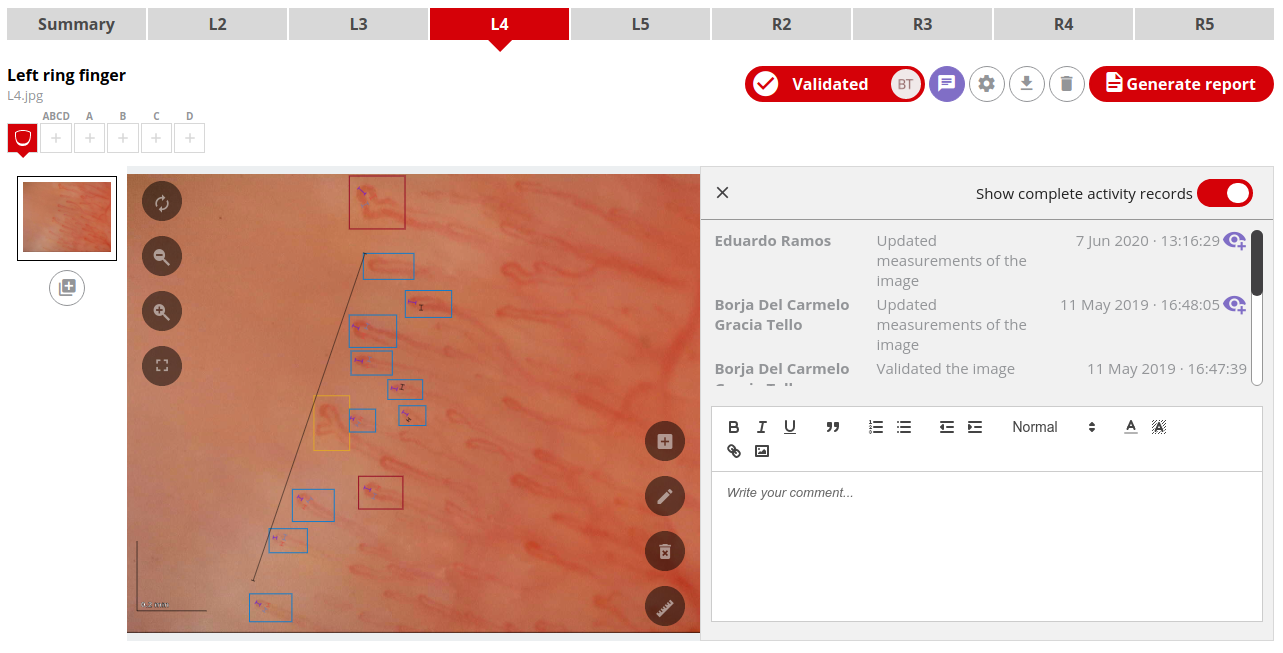
Review automated detections and measurements in the image viewer. Edit annotations, record comments and inspect the history of changes so your study records preserve the context of each review.

Capillary.io image viewer with capillary annotations, measurements, review history and comments
  • Review and edit capillary annotations
  • Inspect measurements against the original image
  • Comments and a visible history of changes

06 / REPORTS

Turn your findings into a clear report.

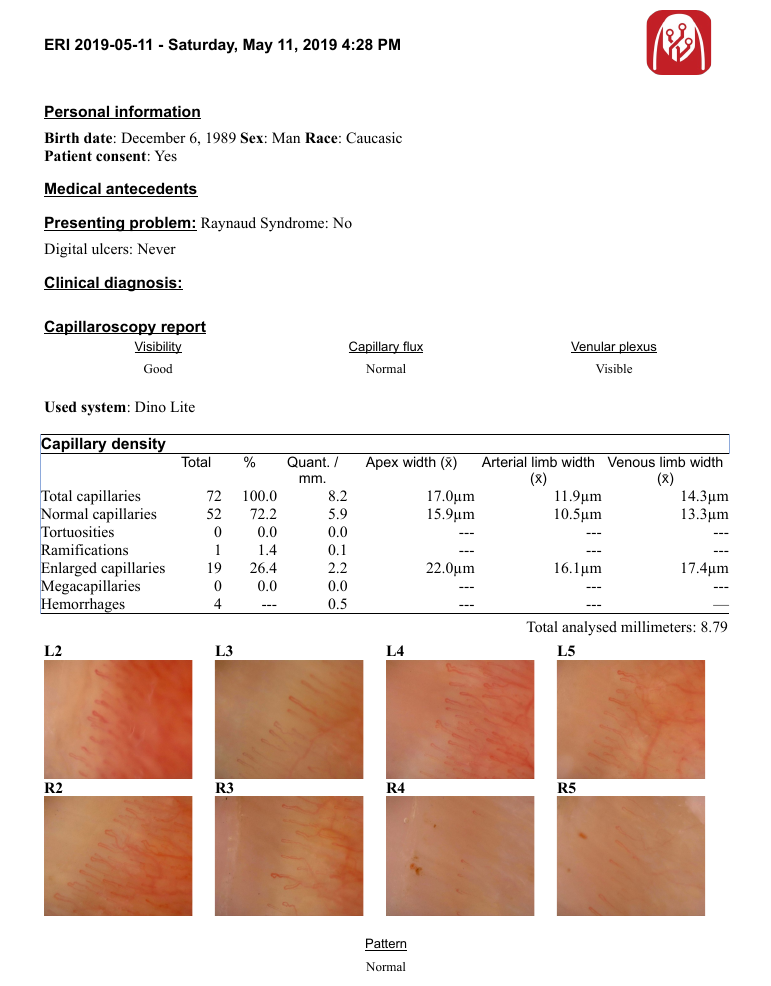
Bring quantitative results, selected images and study information into a structured report. Use the report tools and document templates to prepare material for your study records.

Example Capillary.io report with quantitative capillary measurements and nailfold images
  • Structured reporting
  • Customizable report templates
  • Word documents and printable PDF reports

07 / DATABASE AND EXPORT

Keep your studies organized and portable.

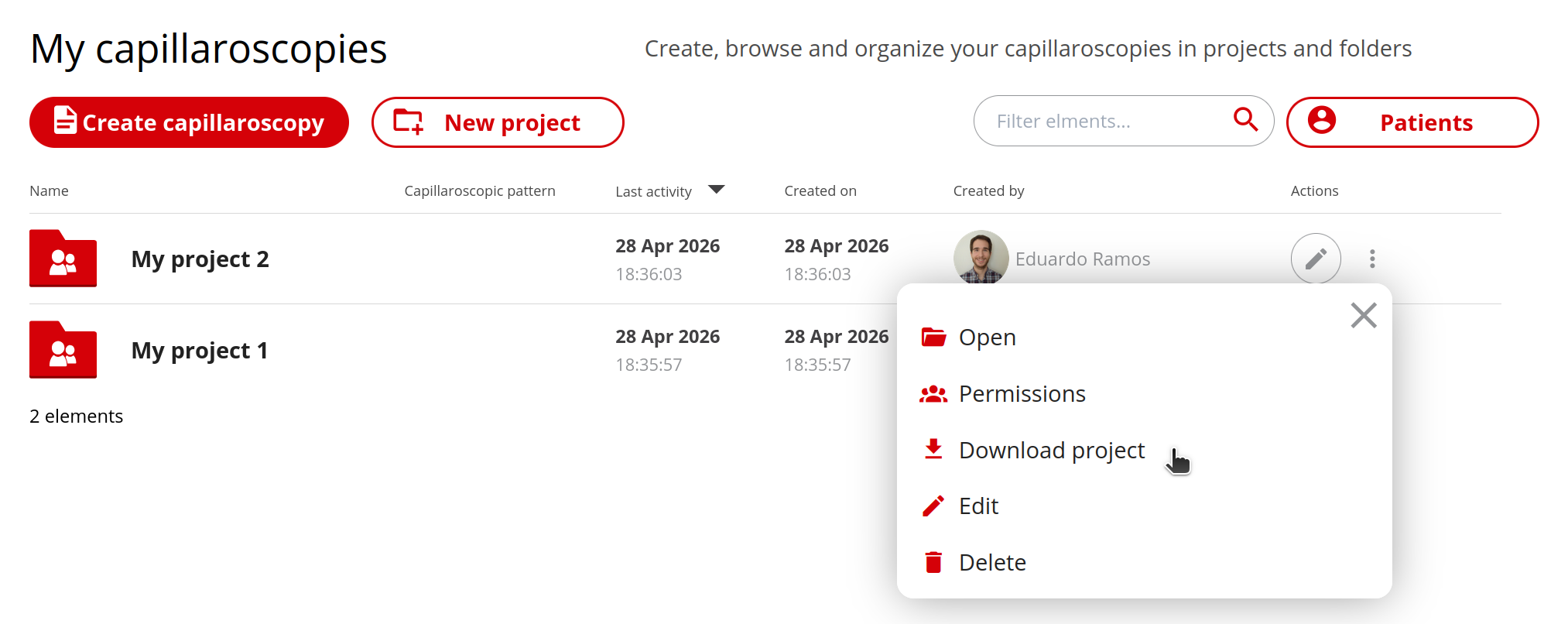
Organize capillaroscopies into projects and folders in your local database. Export measurements for further analysis and download complete collections for your own archives.

Capillary.io project database with folders and the option to download a complete project
  • Local study database, projects and folders
  • Measurement exports and whole-project ZIP archives
  • DICOM ZIP exports for imaging archives

Search & export

Find the studies you need. Export the data behind them.

Turn your capillaroscopy collection into a research dataset. Combine filters to find relevant studies, review their quantitative results and export the data for further analysis.

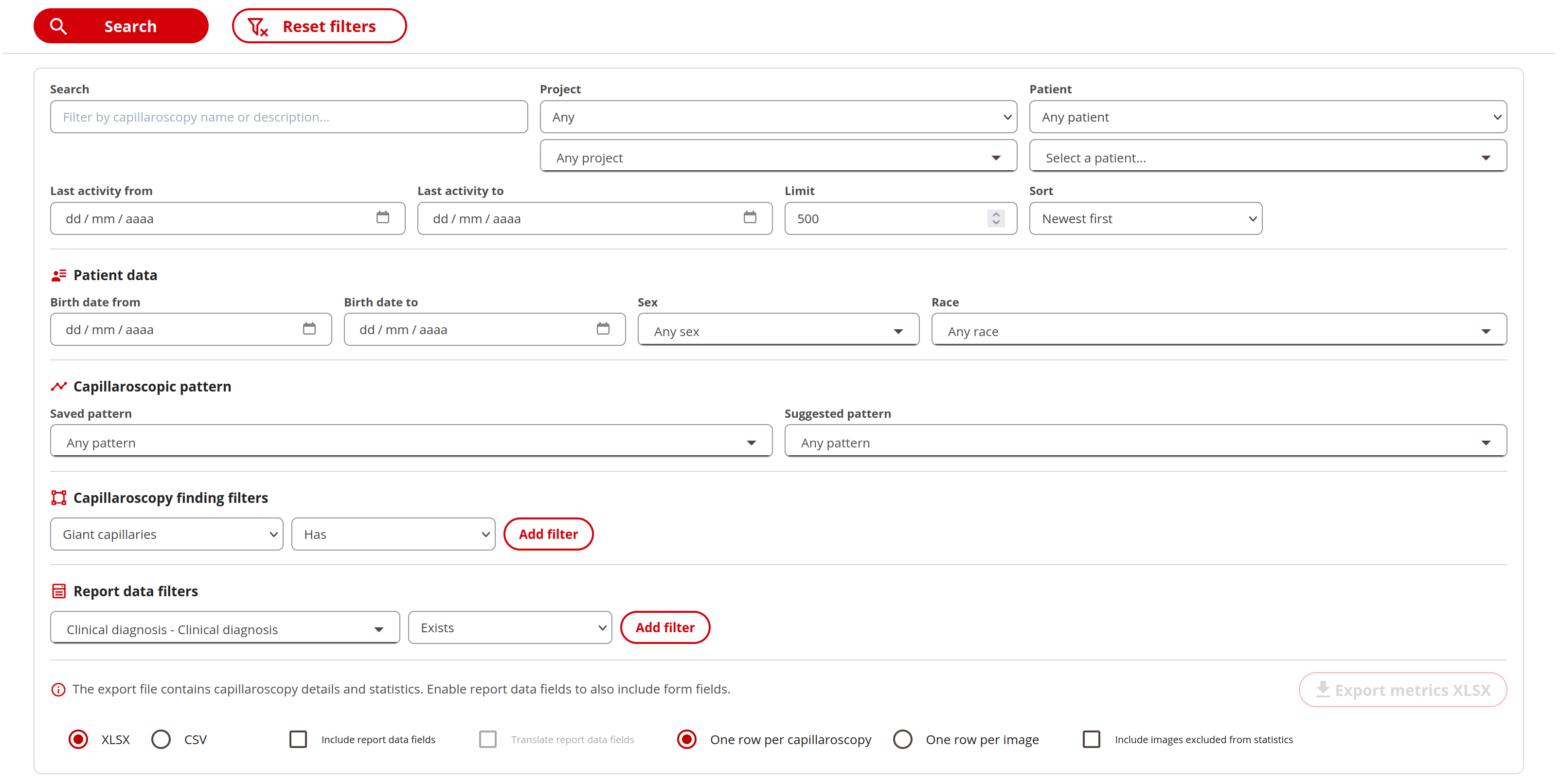
Capillary.io Search & export with project, patient, pattern, capillary finding and report-field filters, plus Excel and CSV export options Enlarge screenshot
  1. Define your search

    • Combine text, projects, patients, demographics and last-activity dates.
    • Filter by saved or suggested patterns, and by the presence, absence, count, percentage or density of capillary findings.
    • Search custom report fields using text matches, numeric or date ranges, yes/no values and selected options.
  2. Review the results

    • Expand each result to inspect capillary counts, percentages, density, apical diameters and limb widths.
    • Open the capillaroscopy or its report directly to review the findings in context.
    • Your most recent search settings are remembered when you return.
  3. Choose your export

    • Download the results as Excel (XLSX) or CSV, with one row per capillaroscopy or per image.
    • Include custom report fields alongside the measurements, with optional translation of those fields.
    • Use images included in statistics, or choose to include excluded images as well.

Included in Desktop Research: search your local database and export on your computer, with no Cloud required.

The complete local workflow. Every Desktop feature included.

Request a software-only quote

LOCAL BY DEFAULT. CLOUD WHEN YOU WANT IT.

Your software does not need a Cloud subscription.

Desktop Research works independently on your computer. If your team also wants an online workspace, we can include Cloud Research in your package.

INCLUDED WITH DESKTOP RESEARCH

Desktop Research

Use the supplied local version as much as you want. Capture, AI analysis, image review, your study database, reports and exports all work locally.

  • Unlimited local use of the included version
  • No monthly image allowance or per-analysis Cloud credits
  • No Cloud account, subscription or image upload required
  • Images and measurements stored on your computer

Your computer’s storage and performance determine practical capacity. Updates, support and any additional installations are specified in your quote.

OPTIONAL · DEPENDING ON YOUR PACKAGE

Add Cloud Research

Extend your setup with an online workspace when you want to share studies with collaborators or work across sites. Your desktop workflow remains independent.

  • Online access from a web browser
  • Shared workspaces and projects
  • Collaboration and controlled access for your team
  • Cloud access can be included in your tailored package

Your quote defines Cloud access duration, users, storage and usage allowances. These apply to the Cloud service, not to your unlimited local use.

Preparing Cloud and Desktop for clinical use

Work towards CE marking under the EU Medical Device Regulation (MDR) is in progress for both Capillary.io Cloud and Capillary.io Desktop. We aim to make clinical editions of both systems available in the near future, subject to successful completion of the required conformity assessment.

The currently available editions remain for Research Use Only and are not intended for clinical diagnosis or patient management.

OPTIONAL ONLINE COLLABORATION

Bring your team together when your study needs it.

For teams working across reviewers or institutions, Cloud Research provides a shared place to organize projects and collaborate. Choose it alongside your local system if it fits the way your team works.

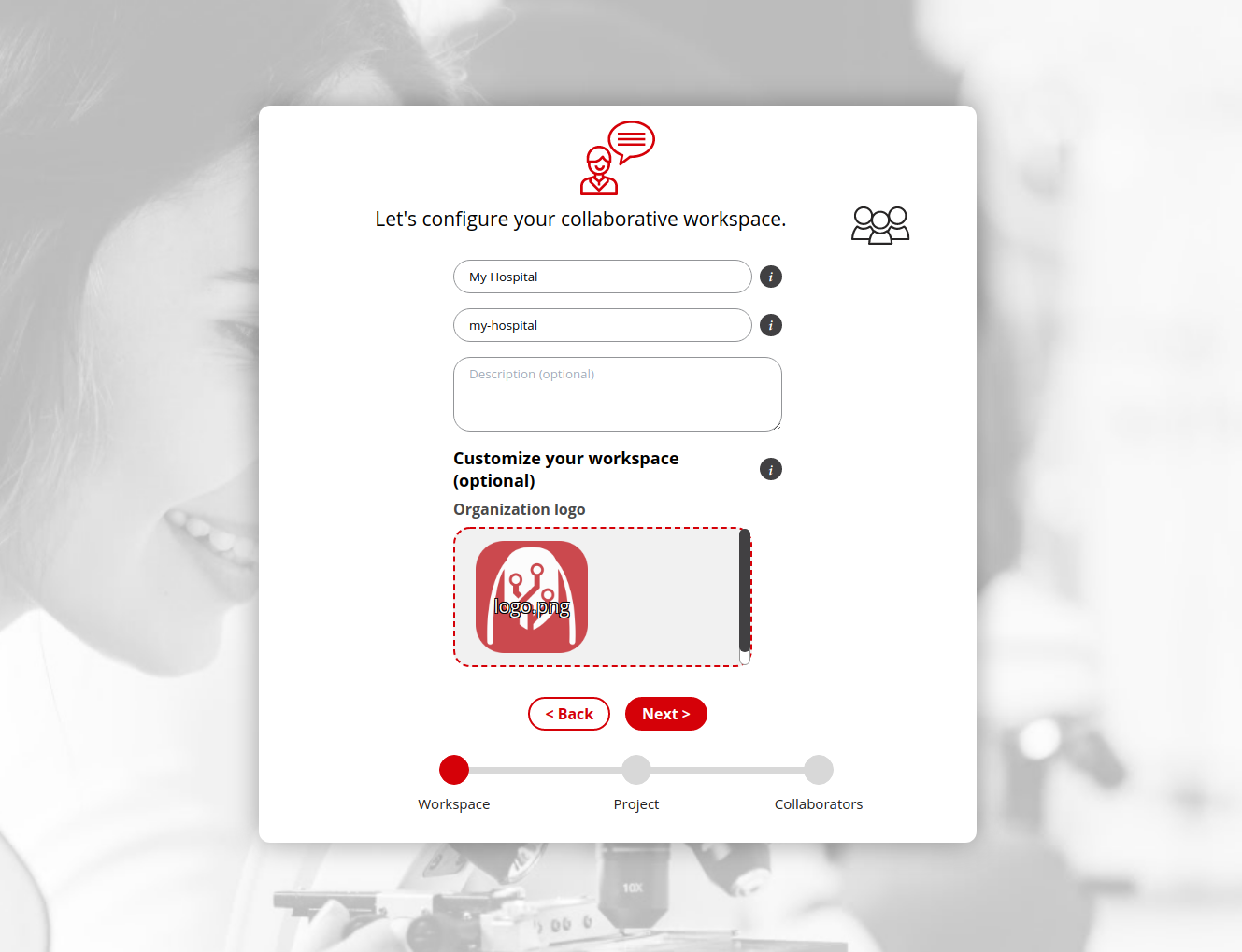
Capillary.io Cloud workspace setup with organization name and collaborative project configuration
Optional Cloud Research workspace. Included only where specified in your package.

DESIGNED AROUND YOUR STUDY

Capture. Analyze. Report.

Keep the path from nailfold images to structured results clear, with expert review at every stage.

  1. 01

    Capture the detail

    Acquire nailfold images with your compatible capillaroscope or import existing images. Define a consistent acquisition and calibration protocol for your study.

  2. 02

    Review the measurements

    Use CAPI-DETECT to assist image analysis. Review detections and quantitative measurements against the source images.

  3. 03

    Report, compare and export

    Organize study records, prepare structured reports and export measurements for further analysis using your chosen statistical methods.

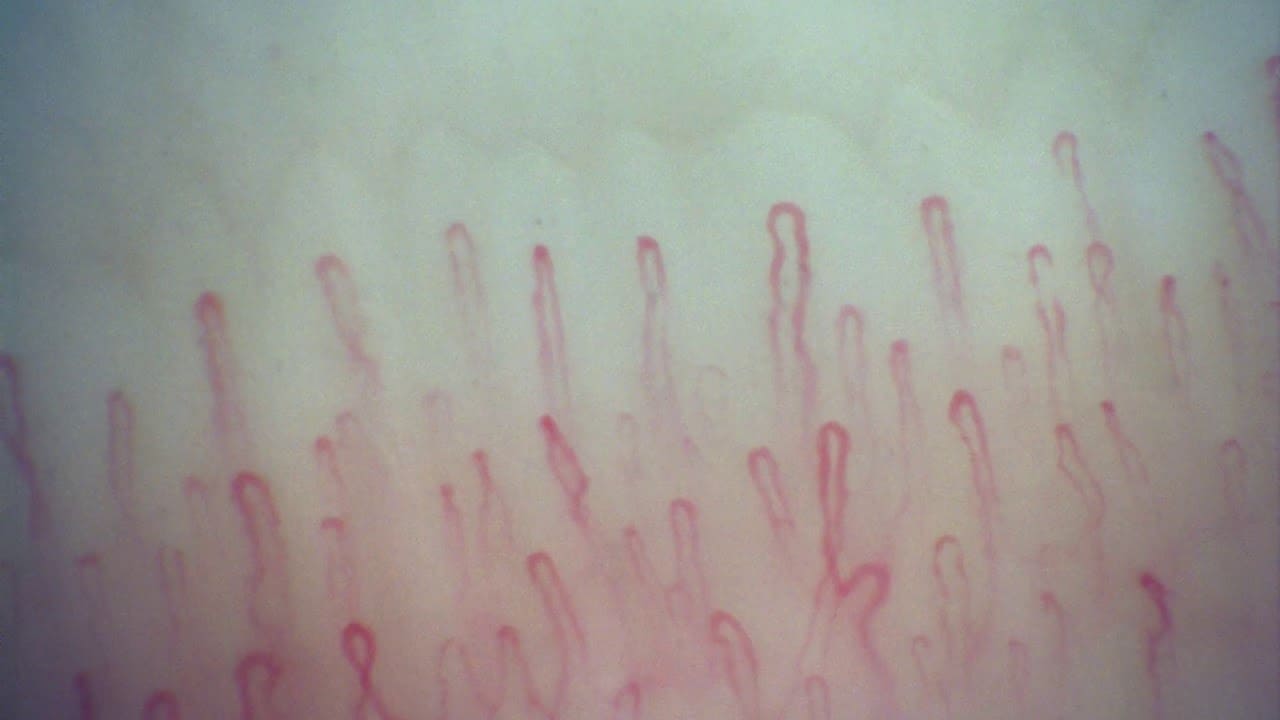
Example nailfold image captured with an Inspectis capillaroscope
Example nailfold image captured with Inspectis.

SMALL STRUCTURES. EVERY DETAIL MATTERS.

See the microvascular detail. Keep the full picture.

For teams studying nailfold morphology, quantitative capillary features and changes over time. Plan the acquisition, review and export requirements around your protocol.

  • Rheumatology teams
  • Hospitals & universities
  • Pharma & CRO studies

Built by people who know capillaroscopy.

Medical experience and software engineering come together in the tools we build. Meet the founders, read the research and explore a complete example study.

Dr. Borja Gracia Tello, MD, PhD

Dr. Borja Gracia Tello, MD, PhD

Co-founder · Internal medicine and capillaroscopy

Internist, Professor of Medicine at the University of Zaragoza and co-author of CAPI-Score and CAPI-DETECT.

Read profile
Eduardo Ramos Ibáñez

Eduardo Ramos Ibáñez

Co-founder and CTO · Software engineering and AI

Software engineer specialized in machine learning and deep learning, leading Capillary.io’s technical strategy and development.

Read profile

Published in Rheumatology · 2025

The research behind CAPI-DETECT

The CAPI-DETECT study examined 1,780 capillaroscopies and developed a machine-learning approach using 24 quantitative variables. Its methods, observer-consensus criteria and validation results are available in the peer-reviewed paper.

The paper details the evaluated algorithm, study population and validation methods.

Explore an active-pattern capillaroscopy.

Open the images, move between fingers and inspect the measurements in our embedded viewer. This is an educational example of an active scleroderma pattern, available without an account.

Open the full viewer

Example for education and software evaluation. It is not a diagnostic service.

BEFORE YOU GET STARTED

Your Desktop software, explained.

Can I buy Desktop Research without a new capillaroscope?

Yes. Capillary.io Desktop Research is available separately, with the same software features and unlimited local use of the supplied version. Tell us your capillaroscope model and computer setup so we can confirm direct capture compatibility or an image-import workflow, including calibration requirements. Cloud Research can also be included in your software-only package if you want it.

What is included in Desktop Research?

All Desktop Research software features are included, with unlimited local use of the supplied version: capture, CAPI-DETECT analysis, image quality assessment, review, the study database, reports and exports. A capillaroscope is not included in the software-only offer. Use your existing compatible device, buy a capillaroscope separately or choose the complete Research System. A pre-installed laptop and Cloud Research are optional.

Can I use the software entirely locally, without Cloud?

Yes. The supplied Desktop Research version provides the complete workflow on your computer, including AI analysis, data storage, image review, reports and exports. You do not need a Cloud account or subscription, and you do not have to upload your images to Cloud.

Are there limits on how much I can use the local version?

You can use the included local version as much as you want, without monthly image quotas or per-analysis Cloud credits. Practical capacity depends on your computer’s storage and performance. Software updates, support and additional installations are covered by the terms of your written quote.

Is Desktop Research intended for clinical use?

The Capillary.io software supplied in this package is for Research Use Only. It is not intended for clinical diagnosis, treatment decisions or patient management. It is intended for qualified healthcare professionals with the training needed to critically review capillaroscopy images and results.

Can Cloud Research also be included?

Yes. If you want online access and collaboration, Cloud Research can be included depending on your package. Your quote specifies the Cloud service period, users, storage and usage allowances. Cloud is optional and its allowances do not limit your local Desktop Research use.

Can I use my existing computer?

Yes. We will confirm your computer’s compatibility and configuration before purchase. Alternatively, ask for a laptop supplied by us with Desktop Research, capture software and the necessary drivers pre-installed and configured for your agreed setup.

How are pricing, installation and support handled?

We prepare a tailored quote for your institution and country. It sets out the equipment, license terms, installation and training arrangements, software updates, support period, delivery and applicable taxes.

Are clinical editions of Cloud and Desktop on the way?

Yes. MDR work is in progress for both Capillary.io Cloud and Capillary.io Desktop. We aim to offer CE-marked clinical editions in the near future, subject to successful completion of the required conformity assessment. The software supplied today remains for Research Use Only. Clinical editions will be separately released versions; upgrade eligibility, cost and technical requirements will be stated in your written offer.

Can you also supply a capillaroscope or the complete system?

Yes. We can supply a capillaroscope separately or the complete Capillary.io Research System, which includes Inspectis hardware, essential capture accessories and Desktop Research. Tell us whether you need software, a device or a complete setup so we can prepare the appropriate quote.

SOFTWARE FOR YOUR EXISTING CAPILLAROSCOPE

Let’s check your setup.

Tell us about your instrument and computer. We’ll confirm compatibility and prepare a Desktop Research quote for your team.

  • Complete local software, without buying another capillaroscope
  • Unlimited local use of the supplied version
  • Compatibility and calibration confirmed before purchase
  • Installation, training, updates and support detailed in your quote

Prefer email?
info@capillary.io

Request your software-only quote

* Required fields

Please do not include patient information in this form.

Basic Information on Data Protection – In accordance with the GDPR and the LOPDGDD, CAPILLARY IO SL will process the data provided for the purpose of managing and responding to your request. For more information about how your data is processed and to exercise your rights, please visit our privacy policy.